
In recent years, building and deploying autonomous mobile robot (AMR) systems for logistics and industrial applications has increasingly required two things: reliable autonomous-driving software and robot platforms with a rich sensor suite.
As the lead developer of Autoware, open-source software for autonomous driving, TIER IV is making autonomy more accessible across a wide range of domains, from passenger vehicles to industrial robotics.
This article walks through how to integrate Nova Carter, a robot platform co-developed by NVIDIA and Segway Robotics that combines hardware, sensors, and compute in a single package, and Autoware Core, a quality-controlled, stability-focused foundation within the Autoware ecosystem, designed to support both development and deployment.
In the past, we integrated the Autoware stack with Nova Carter, the results of which were presented by TIER IV’s Microautonomy Division Manager Yutaka Kondo at NVIDIA GTC 2025. This earlier integration was based on the conventional Autoware architecture, whereas the work in this article focuses on Autoware Core.
The integration described here follows a Nova Carter tutorial that runs on Isaac Sim, NVIDIA’s robotics simulation environment. It allows users to explore several key features of NVIDIA Isaac ROS, including:
- Navigation: Autonomous movement and path planning.
- DNN inference: Deep-learning-based inference, including segmentation, object detection, pose estimation, and depth image estimation, with acceleration and optimization using NVIDIA Triton or TensorRT.
- Visual SLAM: Supports self-localization using one or more stereo cameras and an IMU, as well as map creation for navigation using keypoint point clouds.
- Nvblox: Unlike Visual SLAM, which uses sparse point clouds, Nvblox can generate a reconstructed 3D map. It can also be used as a cost map for navigation. It includes semantic segmentation, enabling the removal of detected objects from the map.
Access the tutorial here: https://docs.isaacsim.omniverse.nvidia.com/5.1.0/assets/nova_carter_landing_page.html
We wanted to explore whether Nova Carter’s convenient functions and its integration with Isaac ROS could also be achieved with Autoware. We first tried this with the standard Autoware stack. After that, we carried out the integration with Autoware Core to confirm the feasibility of other kinds of integration.
Running Autoware Core on Nova Carter
Autoware Core overview
Autoware Core is the foundational software stack within the Autoware ecosystem, built around a set of ROS 2 packages with an emphasis on software quality.
Compared with earlier versions such as Autoware.AI and Autoware.Auto, it has the following characteristics:
- It incorporates standard practices for improving software quality, including pull request reviews, build checks, and test coverage.
- It is one part of a two-tier structure, where Autoware Core focuses on stability and Autoware Universe provides a more experimental and extensible set of packages.
- From the standpoint of being lightweight and easy to work with, Autoware Core avoids the complexity of large automotive stacks and instead focuses on providing the minimum stable set of features needed for technical validation and robot applications. This makes it easier for users to customize the system and develop their own extensions.
Overall, Autoware Core is a compelling foundation that supports a wide range of use cases, from prototyping and development to full deployment.
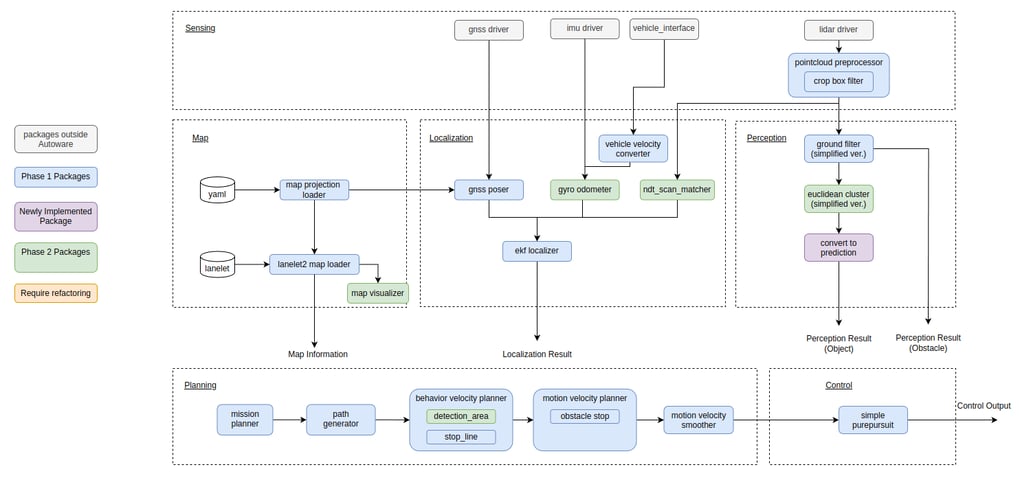 Autoware Core node diagram
Nova Carter overview
Nova Carter is an autonomous mobile robot platform developed through a collaboration between Segway Robotics and NVIDIA.
Its main features are as follows:
- It uses Segway’s RMP Lite platform and mobility system as its base.
- For compute, it is equipped with the Jetson AGX Orin from NVIDIA, featuring 64 GB of memory, a 2 TB SSD, and a 10 GbE PCIe interface.
- Its sensor suite includes 4x stereo cameras (Hawk), 4x fisheye cameras (Owl), 2x 2D LiDARs, and 1x 3D LiDAR.
- Designed as a ready-to-use robot development platform, it supports ROS 2 and targets a broad set of applications, including mixed indoor–outdoor environments, warehouses, and logistics operations.
Nova Carter brings together hardware, sensors, and compute in a single platform, making it a strong foundation for building autonomous mobile robot systems quickly when paired with Autoware Core.
Benefits of integration
The biggest advantage of combining Autoware Core with Nova Carter is the ability to connect autonomous-driving software with robot hardware equipped with a rich sensor suite and high-performance computing, all with minimal setup.
Ready-to-use platform
By connecting the sensors and the Jetson AGX Orin directly to Autoware Core’s standard sensing, localization, planning, and control pipeline, the core structure of an autonomous driving system can be configured.
Lightweight and user-friendly
Autoware Core has a simpler structure than Autoware Universe, making it easier to work with and better suited for rapid development and testing.
- It has fewer dependencies
- A clear package structure
- Easy-to-manage launch configurations
These qualities make Autoware Core particularly attractive for robot applications, where ease of integration and iteration are essential.
Diverse use cases
The flexibility of Autoware Core combined with Nova Carter’s ability to operate both indoors and outdoors makes it easier to develop robots for applications including:
- Warehouse logistics
- Indoor–outdoor patrol
- Research-oriented mobility platforms
- Mapping and SLAM operations
Repositories and setup procedure
This integration uses the following repository: https://github.com/tier4/autoware_nova_carter/tree/autoware_core
The setup steps are based on the information in the README. They have been reorganized below in a clearer format for this article.
Preparation (map creation)
To run Nova Carter with Autoware Core in a real environment, you first need to create maps. Following the Creating maps section of the Autoware documentation, you will need to prepare both a pointcloud map and a vector map.
When creating a vector map for a small mobile robot, you can’t rely on the usual automotive approach of generating lanes along road markings. In this case, bag2lanelet is useful because it lets you create lanes directly from a trajectory recorded during manual operation. Vector maps can also be created and edited using Vector Map Builder.
System environment
The README specifies the following environment:
- Ubuntu 22.04
- ROS 2 Humble
- NVIDIA Jetson AGX Orin (included with Nova Carter)
- CUDA, TensorRT, NVIDIA Driver
- Docker, nvidia-container-toolkit
Cloning the repository
$ git clone -b autoware_core \ https://github.com/tier4/autoware_nova_carter.git $ cd autoware_nova_carter
Building the Docker image
The Autoware Core environment can be managed with Docker, streamlining the setup process.
# For nova_carter $ docker build -t autoware_nova_carter -f ./docker/Dockerfile.nova_carter .
# For autoware_core $ docker build -t autoware_core -f ./docker/Dockerfile.autoware_core .
Launching Nova Carter
Terminal 1 (for launching the sensors):
$ ./docker_sensing_vehicle.sh
(Switches to a terminal inside the container)
# source /autoware_nova_carter/install/setup.bash # ros2 launch autoware_nova_carter_sensing_launch sensing.launch.xml
Terminal 2 (for launching the vehicle modules):
$ docker exec -it vehicle_sensing /bin/bash
(Switches to a terminal inside the container)
# ros2 launch autoware_nova_carter_vehicle vehicle.launch.xml
After startup, you can verify that the sensors and vehicle modules are running by checking the following topics:
Sensors
# Lidar $ ros2 topic echo /sensing/lidar/top/pointcloud_raw
# IMU $ ros2 topic echo /sensing/imu/imu_data
# Velocity Reports $ ros2 topic echo /vehicle/status/velocity_status
Vehicle
# Vehicle Velocity $ ros2 topic echo /vehicle/status/velocity_status
# Virtual Steering Angle calculated from angular velocity $ ros2 topic echo /vehicle/status/steering_status
Launching Autoware Core
Start Autoware Core using the command below. For map_path:=PATH_TO_MAP, specify the folder that contains both the pointcloud map (pointcloud_map.pcd) and the vector map (lanelet2_map.osm). If you set the folder path to PATH_TO_MAP, place the files under $HOME/autoware_map so that the structure looks like this:
$HOME/autoware_map/PATH_TO_MAP ├── lanelet2_map.osm └── pointcloud_map.pcd
Deploy the required files so they match this structure. Now Nova Carter can run with Autoware Core.
$ ./docker_run_autoware.sh
(Switches to a terminal inside the container)
# source install/setup.bash # source /opt/autoware/setup.bash # ros2 launch \ autoware_core \ autoware_core.launch.xml \ map_path:=/autoware_map/PATH_TO_MAP \ vehicle_model:=autoware_nova_carter \ sensor_model:=sample_sensor_kit \ data_path:=/autoware_data \ launch_vehicle:=false
After launching the system, set a goal in RVIZ and the robot will start moving.
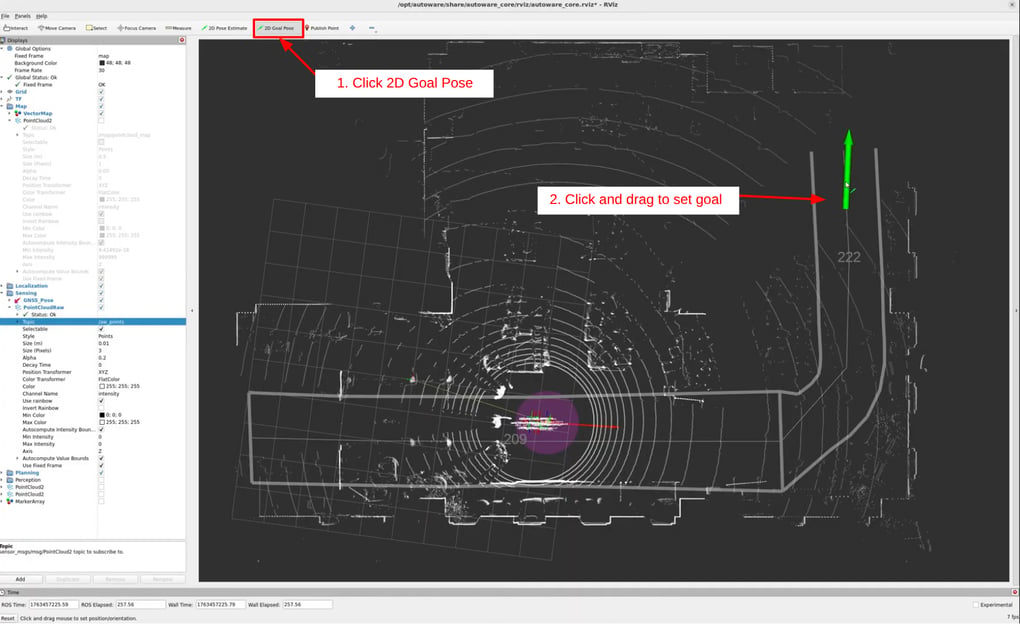
You can verify that the system is running correctly by checking that the following topics are being received:
Localization
# Fused velocity information from vehicle status report and IMU ros2 topic echo /localization/twist_estimator/twist_with_covariance
# Pose Estimation from NDT Scan Matcher $ ros2 topic echo /localization/pose_estimator/pose_with_covariance
# Final localization output after fusing NDT Scan Matcher pose and vehicle velocity $ ros2 topic echo /localization/kinematic_state
Planning
# Planned Trajectory $ ros2 topic echo /planning/trajectory
Control
# Control command output to vehicle $ ros2 topic echo /control/command/control_cmd
If these topics are coming through, the system is working properly.
System overview
This section describes the implementation details required to connect Autoware Core and Nova Carter. The following diagram provides a high-level overview of the interaction.
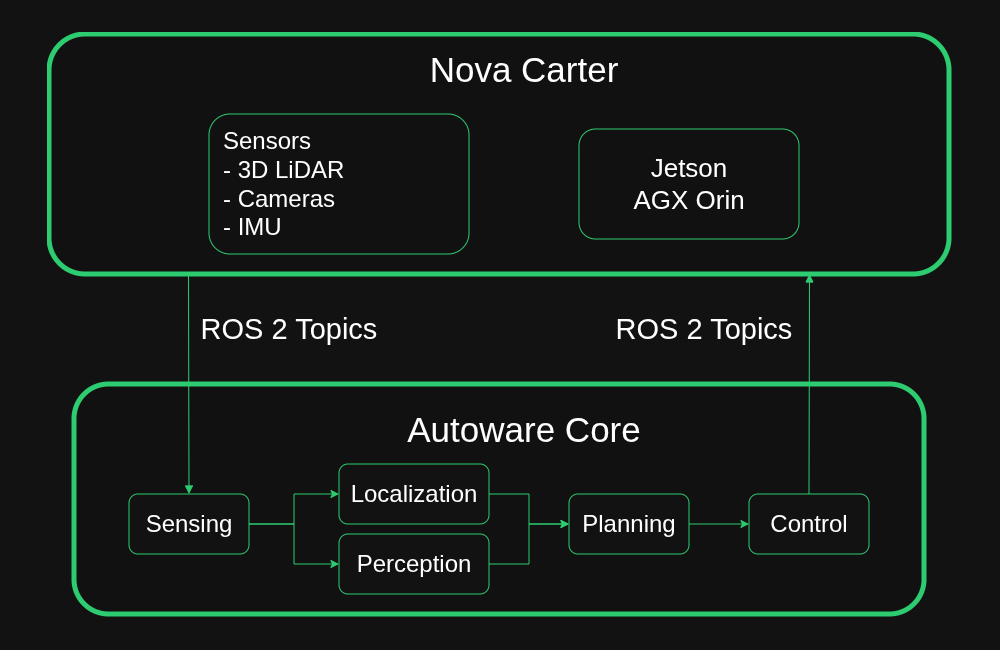
Autoware Core inputs
As of publication, the sensor inputs to Autoware Core are:
- GNSS (optional)
- LiDAR
- IMU
- Vehicle-reported velocity and steering angle
In this integration, we use the LiDAR and IMU installed on Nova Carter, along with the vehicle interface, which sends commanded acceleration and steering values, receives the expected velocity and steering input, and retrieves the current velocity and steering angle from the vehicle.
Sensor launch details
The sensors installed on Nova Carter are launched using the following file: autoware_nova_carter_sensing/launch/sensing.launch.xml
<?xml version="1.0" encoding="UTF-8"?> <launch>
<!-- launch sensors from nova_carter_bringup except for hesai --> <arg name="mode" default="real_world" description="Operating mode" /> <arg name="rosbag" default="None" description="Rosbag file" /> <arg name="enabled_stereo_cameras" default="front_stereo_camera,left_stereo_camera,right_stereo_camera" description="Enabled stereo cameras" /> <arg name="enabled_fisheye_cameras" default="front_fisheye_camera" description="Enabled fisheye cameras" /> <arg name="enabled_2d_lidars" default="front_2d_lidar,back_2d_lidar" description="Enabled 2D lidars" /> <arg name="enable_3d_lidar" default="false" description="Enable 3D lidar" /> <arg name="type_negotiation_duration_s" default="5" description="Type negotiation duration in seconds" />
<include file="$(find-pkg-share isaac_ros_perceptor_bringup)/launch/drivers/nova_sensor_abstraction_layer.launch.py"> <arg name="mode" value="real_world" /> <arg name="rosbag" value="None" /> <arg name="enabled_stereo_cameras" value="front_stereo_camera,left_stereo_camera,right_stereo_camera" /> <arg name="enabled_fisheye_cameras" value="front_fisheye_camera" /> <arg name="enabled_2d_lidars" value="front_2d_lidar,back_2d_lidar" /> <arg name="enable_3d_lidar" value="false" /> <arg name="type_negotiation_duration_s" value="5" /> </include>
<!-- hesai --> <arg name="launch_hw" default="true" description="Whether to connect to a real sensor (true) or to accept packet messages (false)."> <choice value="true" /> <choice value="false" /> </arg> <arg name="config_file" default="$(find-pkg-share autoware_nova_carter_sensing)/config/PandarXT32.param.yaml"/>
<node pkg="nebula_ros" exec="hesai_ros_wrapper_node" name="hesai_ros_wrapper_node" output="screen"> <param from="$(var config_file)" allow_substs="true"/> <param name="launch_hw" value="$(var launch_hw)"/> <param name="frame_id" value="front_3d_lidar"/> <remap from="pandar_points" to="/sensing/lidar/top/pointcloud_raw"/> </node>
</launch>
The main sensor group is launched from the nova_sensor_abstraction_layer.launch.py file provided with Nova Carter. Although Autoware Core does not currently use the 2D LiDAR or cameras, we enable them through launch arguments so they start up as well, allowing us to record logs and keep the option open for future use.
For the 3D LiDAR, the standard Nova Carter driver is disabled via launch arguments. Instead, we launch the driver from the nebula package developed by the Autoware community, which outputs pointcloud data with the additional information required by Autoware.
We also remap the topic names as shown below so that Autoware Core can interpret them correctly.
<remap from="pandar_points" to="/sensing/lidar/top/pointcloud_raw"/>
Vehicle platform launch details
The main body of Nova Carter is launched using the following file: autoware_nova_carter_vehicle/launch/vehicle.launch.xml
<?xml version="1.0" encoding="UTF-8"?> <launch> <arg name="initial_engage_state" default="false" description="/vehicle/engage state after starting Autoware"/> <arg name="launch_vehicle_interface" default="true"/>
<!-- vehicle description --> <include file="$(find-pkg-share nova_carter_description)/launch/nova_carter_description.launch.py"/>
<!-- vehicle interface --> <group if="$(var launch_vehicle_interface)"> <node pkg="autoware_nova_carter_interface" exec="autoware_nova_carter_interface_node" name="nova_carter_interface" output="screen"> <param from="$(find-pkg-share autoware_nova_carter_interface)/config/nova_carter_interface.param.yaml" /> <remap from="odom" to="nova_carter/odom"/> <remap from="vehicle_velocity_report" to="/vehicle/status/velocity_status"/> <remap from="steering_status_report" to="/vehicle/status/steering_status"/> <remap from="control_mode_report" to="/vehicle/status/control_mode"/> <remap from="control_mode_request" to="/control/control_mode_request"/> <remap from="control_cmd" to="/control/command/control_cmd"/> </node>
<include file="$(find-pkg-share nova_carter_bringup)/launch/include/segway_include.launch.py"> <arg name="enable_wheel_odometry" value="false"/> <arg name="namespace" value="nova_carter"/> </include>
<node pkg="topic_tools" exec="relay" name="imu_topic_relay" output="log"> <param name="input_topic" value="/nova_carter/imu"/> <param name="output_topic" value="/sensing/imu/imu_data"/> <param name="type" value="sensor_msgs/msg/Imu"/> <param name="reliability" value="best_effort"/> </node>
<node pkg="tf2_ros" exec="static_transform_publisher" name="imu_tf" args="0 0 0 0 0 0 base_link segway_imu" output="log"/>
<include file="$(find-pkg-share isaac_ros_perceptor_bringup)/launch/algorithms/twist_mux.launch.py"> </include>
</group> </launch>
The main vehicle driver is launched directly from the segway_include.launch.py file in the nova_carter_bringup package provided with Nova Carter.
However, because the velocity information output by nova_carter_bringup and the control signals it accepts differ from Autoware’s interface, we also launch autoware_nova_carter_interface as an adapter between the two systems. Nova Carter, as a mobile robot, is controlled using linear and angular velocity, whereas Autoware is designed around the control model of a general-purpose vehicle, using linear velocity and steering angle. The autoware_nova_carter_interface package converts the robot’s linear and angular velocities from Nova Carter into the linear velocity and a virtual steering angle expected by Autoware.
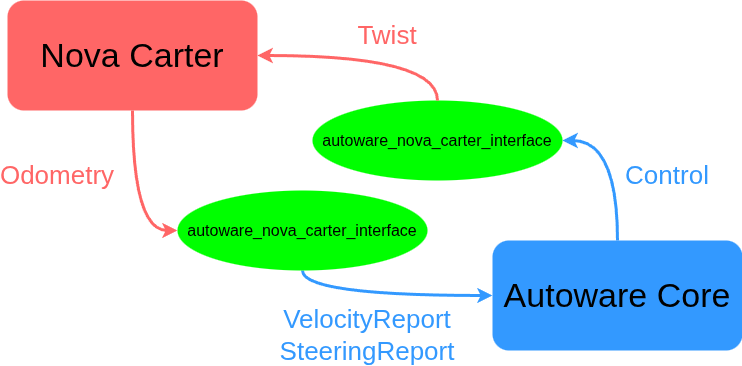
As with the sensors, we also remap the topic names as shown below so that Autoware Core can interpret them correctly.
<remap from="vehicle_velocity_report" to="/vehicle/status/velocity_status"/> <remap from="steering_status_report" to="/vehicle/status/steering_status"/> <remap from="control_mode_report" to="/vehicle/status/control_mode"/> <remap from="control_mode_request" to="/control/control_mode_request"/> <remap from="control_cmd" to="/control/command/control_cmd"/>
.......
<param name="output_topic" value="/sensing/imu/imu_data"/> <param name="type" value="sensor_msgs/msg/Imu"/>
.......
Autoware Core launch details
Autoware Core is launched using the following launch file: autoware_core/autoware_core/launch/autoware_core.launch.xml
No additional configuration, such as topic remapping, is required here.
Wrap-up
In this article, we walked through the integration process between Nova Carter and Autoware Core. By combining Nova Carter’s robust hardware foundation with Autoware Core’s stability-focused software stack, it becomes possible to build and deploy autonomous mobile robot systems quickly for both indoor and outdoor operation.
For TIER IV, this work reflects a broader goal: extending open-source software for autonomous driving beyond traditional automotive use cases. By validating Autoware Core on platforms such as Nova Carter, we continue to expand the range of real-world environments in which Autoware can operate.
Acknowledgments
We were able to use Nova Carter for the integration introduced in this blog through the generous support of NVIDIA Japan. We would like to express our sincere gratitude to everyone at NVIDIA Japan for their cooperation.
About the authors
Ryohsuke Mitsudome | Autoware Engineering Department
Ryohsuke joined TIER IV in 2018 and currently serves as manager of the Autoware Engineering Department, where he oversees Autoware development and quality assurance. Since 2021, he has also served as chairman of the Autoware Foundation’s Technical Steering Committee. In addition to code maintenance, his work focuses on community management and project support, including organizing working groups and defining the Autoware development roadmap.
Junya Sasaki | Autoware Engineering Department
Junya joined TIER IV in 2024 as a software engineer. Prior to TIER IV, he worked at a video analysis platform, where he managed software development, maintenance, and operations while specializing in video analysis technologies. He holds a master’s in experimental particle physics.
Related blog
Integrating Autoware on small robot platforms
TIER IV is always on the lookout for passionate individuals to join our journey. If you share our vision of making autonomous driving accessible to all, get in touch.
Visit our careers page to view all job openings.
If you’re uncertain about which roles align best with your experience, or if the current job openings don’t quite match your preferences, register your interest here. We’ll get in touch if a role that matches your experience becomes available, and schedule an informal interview.
Inquiries
- Media: pr@tier4.jp
- Business: sales@tier4.jp
Social Media
X (Japan/Global) | LinkedIn | Facebook | Instagram | YouTube
More