
TIER IV’s system software team is researching and developing OS mechanisms specialized for autonomous driving systems implemented using Autoware. The team is focusing on task scheduling to meet the real-time constraints of autonomous driving systems. Various options are being considered for the operating system on which Autoware runs, one of which is the Linux kernel.
TIER IV is looking into prior research projects as the basis for a custom task scheduler in the Linux kernel. One of our student engineers tested one such candidate.
The test focused on Plugsched, which was proposed in a paper presented at ASPLOS 2023: "Efficient Scheduler Live Update for Linux Kernel with Modularization." Other custom scheduler technologies include ghOSt and eBPF programs that allow the implementation of schedulers, but Plugsched has the advantage of low overhead and high flexibility by allowing direct modification of the scheduler code.
For this project, we set up an environment for live updating the Linux kernel scheduler and conducted experiments to customize the task scheduler.
Plugsched: A tool for live updates of Linux kernel scheduler
Traditionally, to change the behavior of the Linux kernel scheduler or add a new scheduler class, you had to directly modify the Linux kernel's source code and rebuild it. This made the development cycle cumbersome and created a barrier to introducing custom task schedulers.
Plugsched, proposed at ASPLOS 2023, enables live updates of the task scheduler through kernel module updates. The steps below indicate how the Linux kernel scheduler is modularized, allowing the main scheduler functions in the kernel to jump to the scheduler code in the kernel module. The general principle of operation is as follows:
- Static analysis tools are applied to the source code of the task scheduler portion of the Linux kernel. The customizable portions of the task scheduler are extracted and used as a template for the kernel module.
- Programmers edit the template of the kernel module and implement their custom task scheduler.
- The kernel module is built and loaded. The kernel module modifies the instructions in memory so that calls to the custom kernel's task scheduler-related functions jmp to the custom implementation on the kernel module.
- A stack pivot is performed to ensure that the __schedule() function operates correctly (for more details, refer to the paper).
Using the above method, the task scheduler can be live updated without rebuilding the kernel, allowing the custom task scheduler to remain operational.
Changes from the original implementation
Following communication with the authors, modifications were implemented to the environment and procedures due to difficulties encountered while attempting to follow the instructions in the README. The adjustments proved effective, resulting in a successful operation: (yushoyamaguchi/Plugsched).
The main changes from the original implementation method are as follows:
- It was originally designed for the Anolis OS distribution, but we adapted it to work with the more common Fedora distribution. This included modifying LLVM options used in code analysis and changing commands for handling rpm packages.
- The container registry for podman used in the author's implementation was not accessible, so it was modified to build the container images for podman locally.
The reason for selecting Fedora as the experimental environment is that the author's implementation of Plugsched assumed the use of rpm packages. Although there are multiple distributions that support rpm packages, we opted for Fedora, which we are familiar with. Specifically, we chose Fedora 33 as our working environment for conducting the experiments.
At this stage, Plugsched does not work with kernel versions 6.x and newer, so it is necessary to keep this in mind when selecting a distribution version. This is because there is a discrepancy between the symbol information contained in vmlinux, which the compiler recognizes, and the actual location of functions in the source code. This discrepancy prevents the successful extraction of the scheduler portion of the kernel code. (Discussed at the end of this issue.)
Setup procedure
1. Install the desired version of the Linux kernel in the Fedora environment
After setting up the Fedora 33 environment, download kernel-5.10.11-200.fc33 from a site that distributes various build images for Fedora. Since the author's implementation of Plugsched provides configuration files for static analysis compatible with Linux kernel-5.10, we chose this kernel version for experimentation.
Download the following files:
- kernel-<version>.rpm
- kernel-core-<version>.rpm
- kernel-modules-<version>.rpm
After downloading the images, proceed with the installation as follows. It's convenient to set the default index for the kernel to boot in the GRUB configuration.

2. Get the Linux kernel source code
Download the source code for the Linux kernel of the same version installed in Step 1. You can download it in rpm format from the site mentioned above.
3. Create a container for Plugsched build
Create a podman container image to build Plugsched.

Next, launch the container using the built image.
- /path/to/host_workspace corresponds to the workspace on the host system.
- /path/to/container_workspace corresponds to the workspace within the container.
Set these paths to your preferred locations.
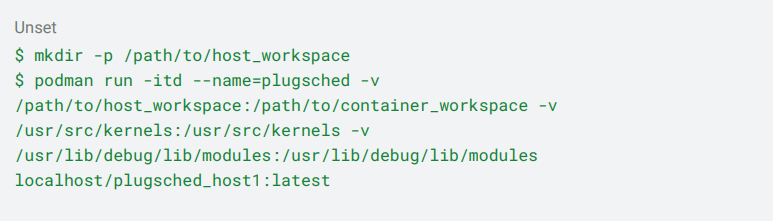
Move the Linux kernel source code obtained in Step 2 to /path/to/host_workspace.
4. Unpack Linux kernel source code
Within the container, use the tools provided by Plugsched to unpack the Linux kernel source code downloaded as an rpm package and store it locally.
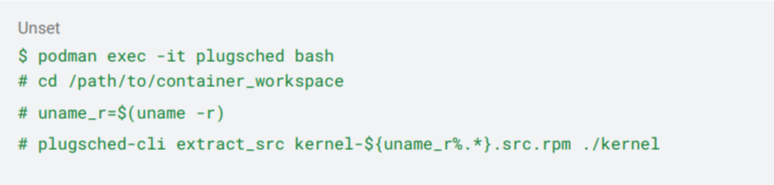
5. Extract the task scheduler as a kernel module
Perform static analysis on the Linux kernel source code and extract the task scheduler part as a kernel module template. The extracted code for the task scheduler is located in ./scheduler/kernel/sched/mod.

With the above steps completed, the environment for creating the custom task scheduler is now set up.
Deployment procedure for custom scheduler
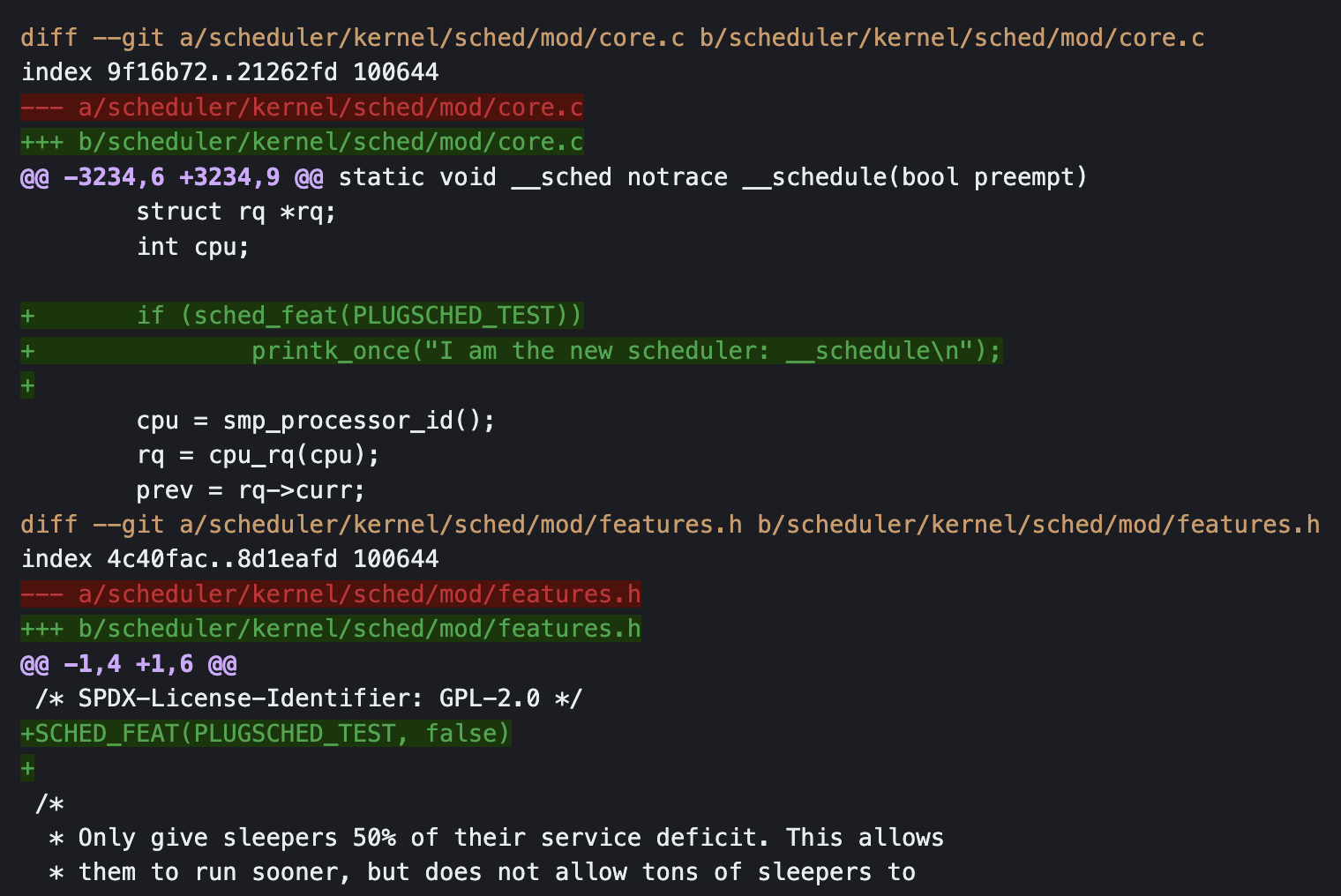
1. Modify extracted scheduler code
Modify the code of the task scheduler located in ./scheduler/kernel/sched/mod, which serves as the template for the kernel module. Here, you'll implement the functionality of your custom task scheduler. For this tutorial, we'll make changes similar to those described in the original README.
2. Build kernel module as rpm package
Build your custom task scheduler implementation as an rpm package to create a loadable kernel module.

For clarity, move the generated rpm package to the top of the working directory and then exit from the container.
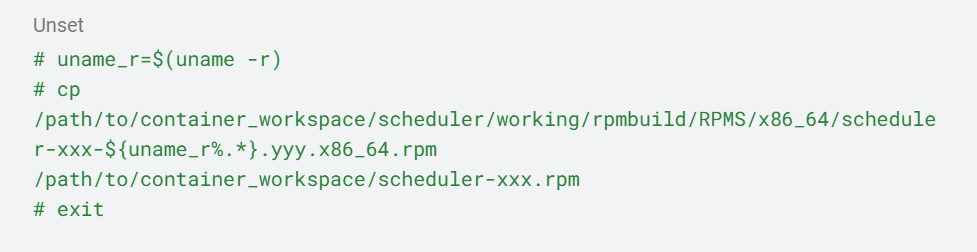
3. Load task scheduler as kernel module
When the package is installed with the rpm command, it triggers the loading of the kernel module and the associated binary rewriting of the original scheduler portion in memory. This deploys the custom task scheduler.
In the following example, the successful deployment of the custom task scheduler can be confirmed through the presence of flags added to sched_features and by checking the kernel log.
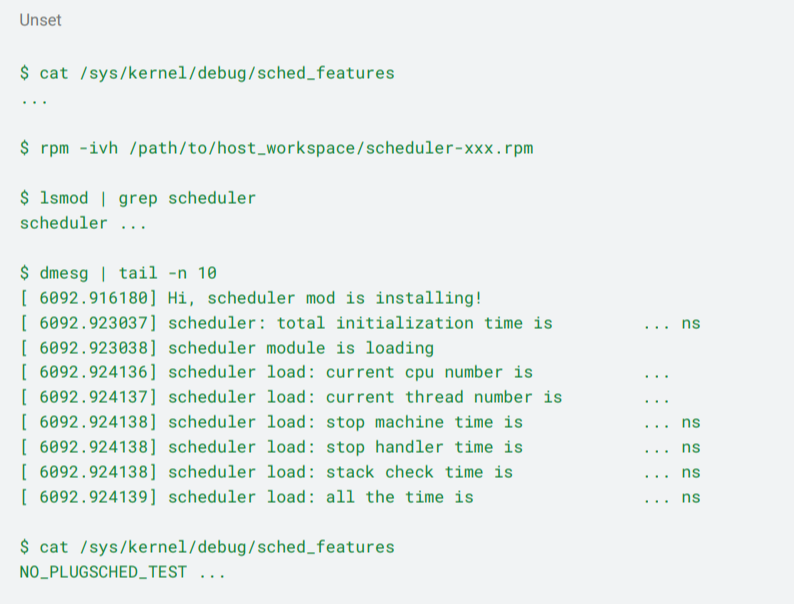
The operation of the custom task scheduler can be confirmed by activating the flags added to sched_features.
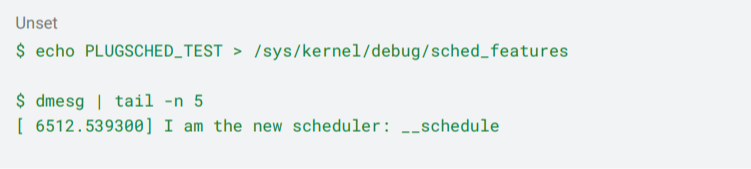
4. Unload the custom task scheduler
The operation of unloading the custom task scheduler and returning it to the original task scheduler is also performed through the rpm command. Direct unloading via the rmmod command is not allowed.

Experimenting with Plugsched
With the setup completed, an environment for implementing and deploying the task scheduler as a kernel module has been established. Next comes the challenge of implementing the custom task scheduler.
Originally, the plan was to implement a task scheduler specialized for autonomous driving applications such as DAG Scheduling Theory. However, due to time constraints, efforts were limited to trying out simple experimental functions.
Since adding a new scheduling policy would impact a wide range of the task scheduler code, we decided to experiment with modifying the functionalities of existing scheduling policies. The Linux kernel primarily features three types of task schedulers, but for this experiment, we chose to modify the simplest one, the FIFO (First In First Out) scheduler.
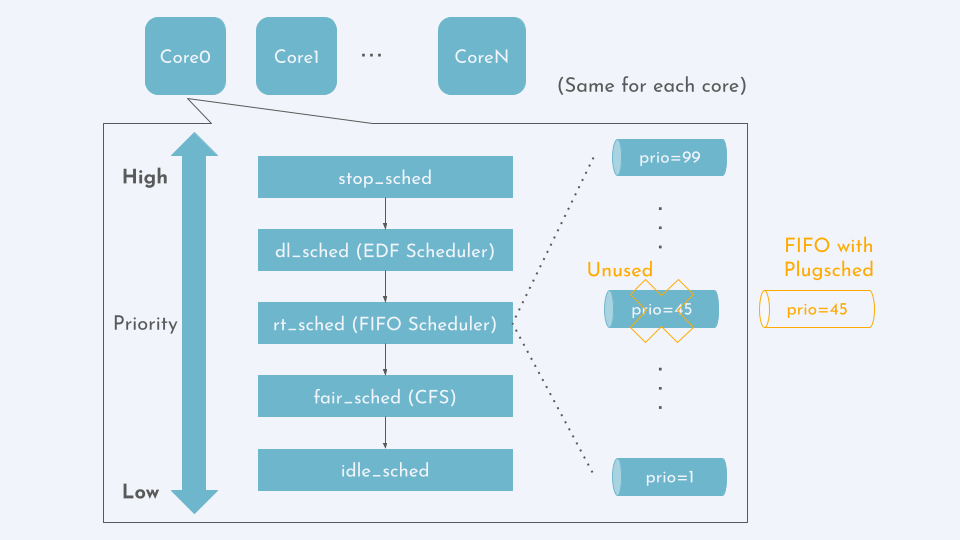
In the FIFO scheduler, there are FIFO queues for each priority level. In this modification experiment, we attempted to handle tasks of a specific priority level using the custom scheduler while handling tasks of other priority levels with the conventional FIFO scheduler. The modified code is available on GitHub.
Primer on Linux kernel scheduler
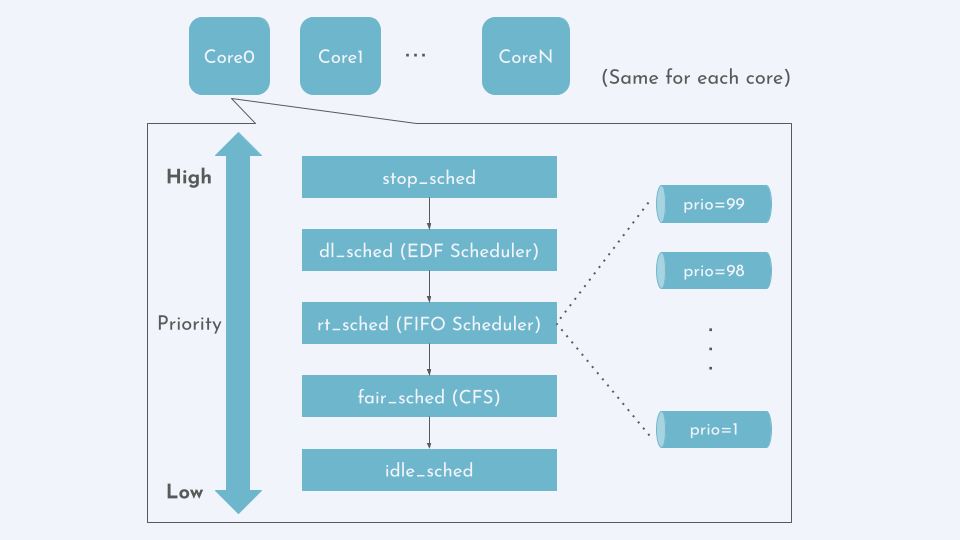
Each task (thread) managed within the Linux kernel possesses a scheduling class as one of its attributes. Depending on this scheduling class, the scheduler determines how to handle the task.
There are five scheduling classes, ranked from highest to lowest priority: stop_sched, dl_sched, rt_sched, fair_sched, idle_sched.
For each core, when selecting the next task to execute, the scheduler first checks if there are any tasks in the 'Ready' state within each scheduling class, in the order of scheduling class with the highest priority. When a class with Ready tasks is found, the task scheduler selects the next task to execute from the Ready tasks belonging to that class.
Tasks belonging to the dl_sched class are scheduled by the EDF (Earliest Deadline First) scheduler, tasks belonging to the rt_sched class are scheduled by the FIFO scheduler, and tasks belonging to the fair_sched class are scheduled by the Completely Fair Scheduler (CFS).
The scheduling described above is performed independently for each core. However, load balancing is performed among cores with the same scheduling class.
The FIFO scheduler chosen for modification has independent FIFO queues for each priority level (1-99). The task at the head of the queue with the highest priority is dequeued first.
FIFO scheduler modification
As stated above, we attempted to modify the FIFO scheduler to handle only tasks with specific priorities differently. In this experiment, we modified the scheduler to handle only tasks with priority 45 using a new FIFO queue provided by Plugsched, rather than the conventional FIFO queue.
An important point to note when using Plugsched is that modifications cannot be made to data structures accessed by subsystems other than the task scheduler. This is because Plugsched deploys the task scheduler as a kernel module without rebuilding the existing kernel code.
Typically, when creating data structures like queues to manage tasks, they are designed so that pointer variables can be accessed from multiple structures. However, in this case, we have defined them as global variables instead of implementing such a structure.
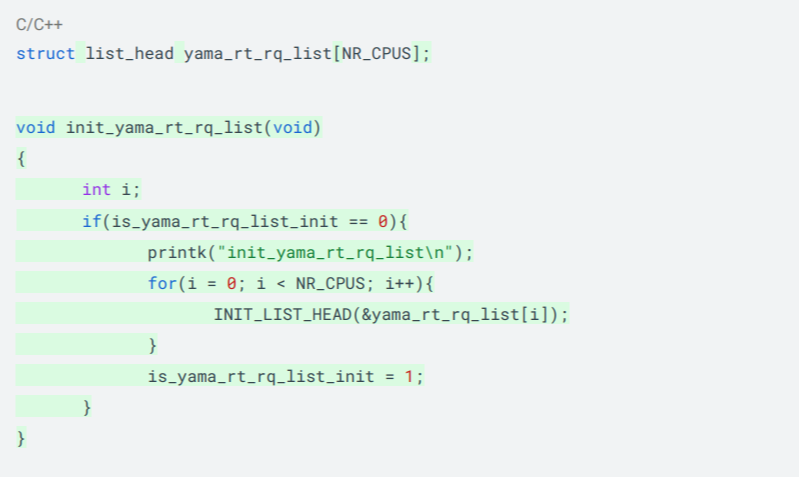
Typically, Plugsched involves adding custom data structures like this for implementation purposes.
The custom scheduling algorithm will be implemented on this custom data structure. However, since the purpose of this experiment is to conduct a simple test, a straightforward FIFO algorithm has been chosen for selecting tasks from this custom queue. Additionally, for simplicity, load balancing between the queues of priority 45 that exist on each core was not considered.
Demonstration of functionality
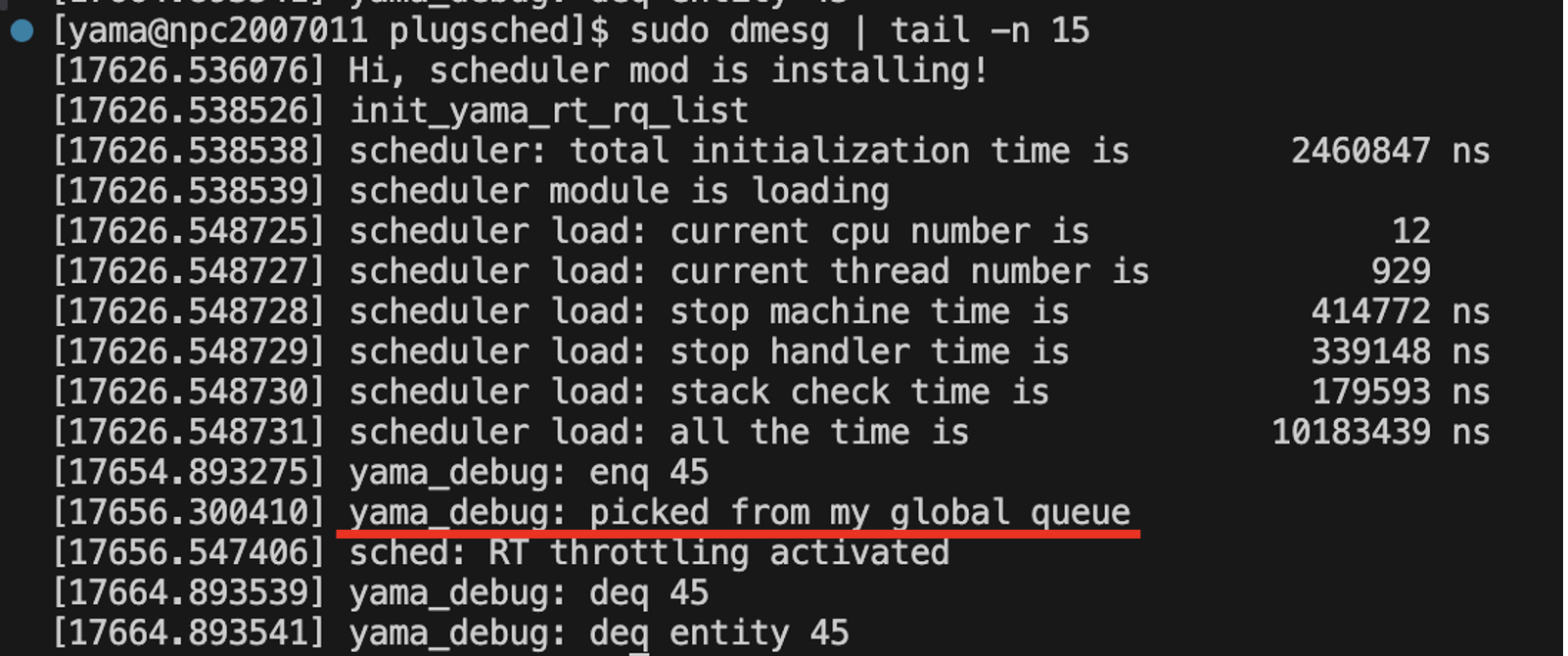
A debug print was implemented to check the operation, which triggers when a ready task of priority 45 is selected from the custom FIFO. A sample program that runs a task with a priority 45 SCHED_FIFO policy is located in the following repository: https://github.com/yushoyamaguchi/sched_playground/blob/main/put_rt_task/put_rt.c
We conducted the experiment and confirmed the corresponding log in the dmesg output. Since we utilized the printk_once macro, it was only output once.
Wrap up
Looking ahead to a future where task schedulers specialized for autonomous driving applications are implemented in Linux, we conducted basic experiments on the live update technology for the Linux kernel scheduler presented at ASPLOS 2023. Moving forward, we will continue research and development on elemental technologies, as well as on new OS mechanisms specialized for autonomous vehicles, contributing to the development of operating systems for unmanned driving services.
TIER IV is applying cutting-edge research and development to advance autonomous driving technology. Many of our team members began their journey as part-time student engineers before transitioning to full-time roles after graduation. Our system software team is currently seeking student engineers with a passion for hacking and modifying the Linux kernel to tailor it for autonomous driving. If you're interested in joining us on this exciting journey, we can't wait to hear from you!
Takahiro Ishikawa | System software team
A specialist in operating and real-time systems, Takahiro joined TIER IV in April 2022 following a stint as a part-time engineer from 2020. He holds a master's degree from the Graduate School of Information Science and Technology at the University of Tokyo and is currently enrolled in a professional doctoral program. At TIER IV, he is responsible for low-level software related to Autoware's real-time performance.
TIER IV is always on the lookout for passionate individuals to join our journey. If you share our vision of making autonomous driving accessible to all, get in touch.
We’re currently hiring for the following related positions:
Visit our careers page to view all job openings.
If you’re uncertain about which roles align best with your experience, or if the current job openings don’t quite match your preferences, register your interest here. We’ll get in touch if a role that matches your experience becomes available, and schedule an informal interview.
Media contact
pr@tier4.jp
Business inquiries
sales@tier4.jp
Social Media
X (Japan/Global) | LinkedIn | Facebook | Instagram | YouTube
More