
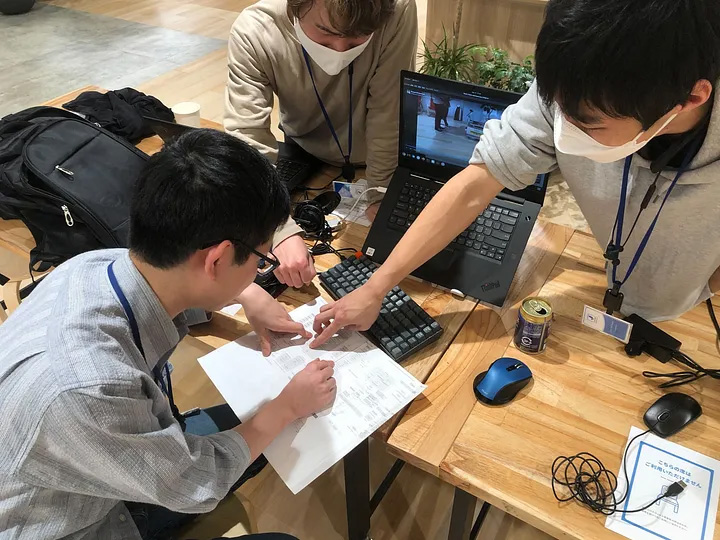
TIER IV develops autonomous driving platforms built around the open-source software Autoware, with the goal of making this technology accessible to all. Through the power of open-source software, we’re shaping a diverse community, collaborating with companies, research institutes and developers on a complete autonomous driving system.
Easing access to the Autoware community is essential to truly democratize autonomous driving technology. Even though the software is open source and freely available, if the barriers to entry remain high, adoption will stall. Autoware is already used worldwide by companies and research institutions, but from within TIER IV, it can sometimes be difficult for engineers to understand how the software is perceived from the outside.
To get a clearer picture, a team of recent graduates was tasked with installing Autoware on two platforms: an autonomous mobile robot with a simple hardware setup and a Toyota JPN Taxi equipped with more advanced features. The project was designed to re-examine how we might lower the barriers to entry, drawing on the perspective of newcomers with little prior knowledge of Autoware, working without access to internal information.
This initiative also served as a boot camp for the recruits. By operating real vehicles, they were able to gain an understanding of the full scope of autonomous driving while making tangible contributions to the wider Autoware community. The following section provides an overview of their experience.
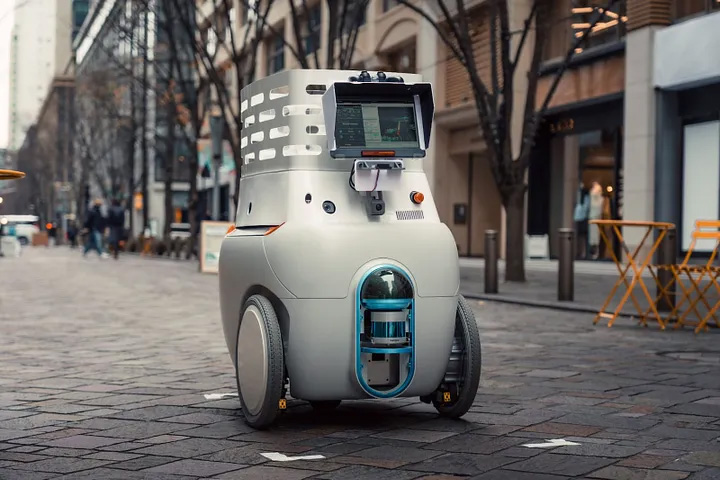
An autonomous mobile robot prototype
Autonomous mobile robot
Autoware includes three key autonomous driving functions: recognition, planning, and control. During driving, Autoware collects data from sensors such as LiDAR, cameras, and IMU, processes that data through its modules to recognize the surrounding environment, calculates the optimal trajectory, and finally sends control commands to the vehicle.
Vehicle interface
To run Autoware on real vehicles, an interface must first be implemented. This interface serves two main roles:
- Acquiring data from on-board sensors such as LiDAR and cameras
- Sending control commands—such as wheel rotation speed—to the vehicle
In Autoware, localization is performed by matching a predefined point cloud map with the point cloud data obtained from LiDAR. Since our vehicle was equipped with Velodyne LiDAR, we installed the official ROS package.
We then prepared a low-level controller for wheel rotations (rpm) and a controller node that converts the Ackermann steering values used in Autoware into rpm. With this interface node in place, commands from Autoware are translated into control signals and sent directly to the vehicle.
At this stage, it became possible to manually move the vehicle by publishing topics from the command line to the controller node while acquiring real-time data from the sensors.
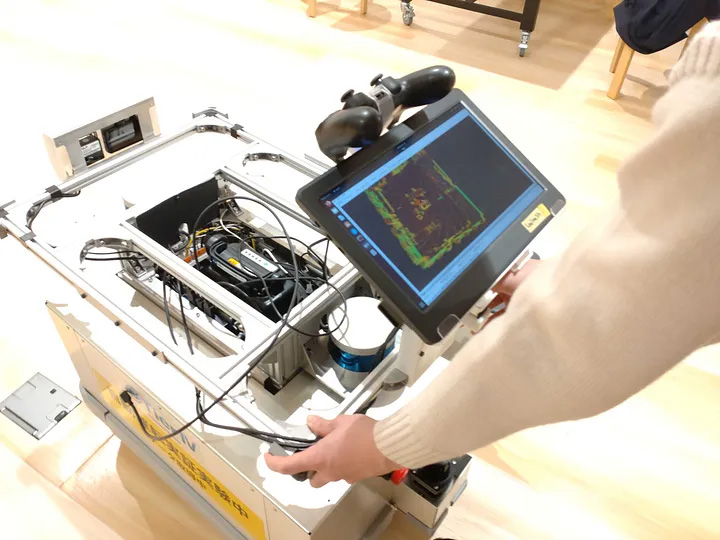
A team member creates a point cloud map at TIER IV’s office in Tokyo.
Point cloud maps
Autoware requires a LiDAR-based 3D point cloud map. Because the current version of Autoware does not include a mapping algorithm, we needed to rely on an open-source package or other third-party software to build one. For this project, we used LiDARslam_ros2, which supports ROS 2 and can generate maps using LiDAR alone. With this in place, the vehicle could now estimate its position in real time as it moved. The next step was to plan routes to the destination and around the surrounding environment.
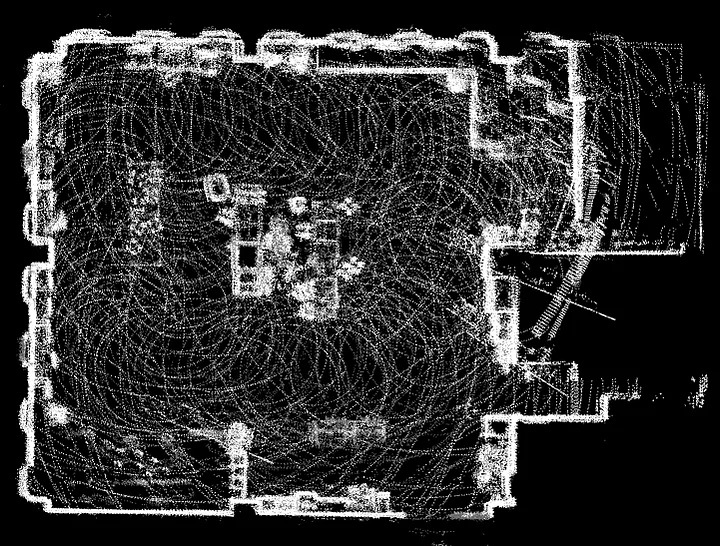
The generated point cloud map
Vector maps
In addition to point cloud maps, Autoware also requires vector maps. These define the drivable area of the road, along with traffic signals and signs, for use in planning and other functions. XML format is used for the maps, which can be created with a graphical interface using our dedicated Vector Map Builder.
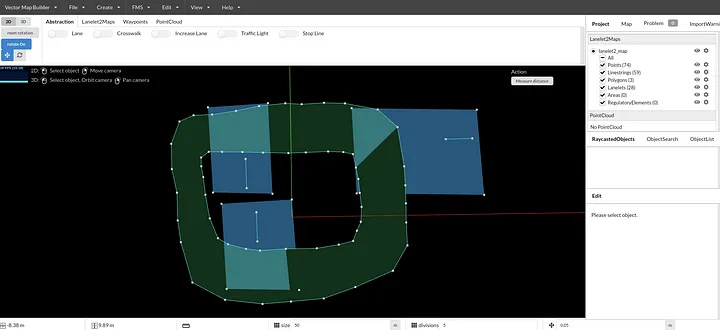
Vector map of the office circuit
For this project, we created a simple vector map with one-way traffic (clockwise in the figure) and designated parking spaces. At this stage, the system was ready to operate a vehicle autonomously with Autoware. The autonomous mobile robot successfully completed 100 laps of the course, and we confirmed that it would stop when the system detected an obstacle using its LiDAR.
Object detection
For autonomous driving, it is essential to recognize surrounding objects such as pedestrians and vehicles. However, because the robot was not equipped with a GPU, we could not use the default object detection algorithm in Autoware as is.
Instead, we applied the Euclidean clustering algorithm, which Autoware also provides as an optional component. This method uses a classical clustering technique rather than a deep learning–based approach. While it is less accurate than deep learning algorithms, it allowed us to perform object detection on the robot without requiring a GPU.
Parking maneuver
In addition to regular driving, Autoware also includes a parking function designed for use in areas such as parking lots, which we also tested in this experiment. The feature can be used simply by assigning a parking lot label to a vector map and setting that area as the goal. It relies on the Hybrid A* algorithm, which performs route planning while taking the vehicle’s motion model into account, and calculates a path that includes turnarounds when a maneuver cannot be completed in a single move.
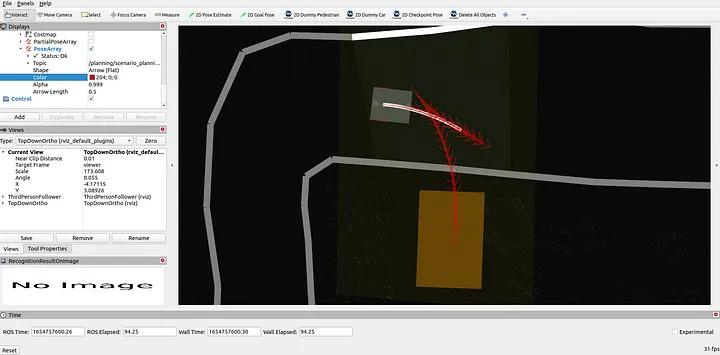
Find the code for this section here: autoware.diff_drive
Robotaxi
We installed Autoware from scratch on our JPN Taxi, which was already equipped with an onboard computer. It took several days for us to resolve compatibility issues with NVIDIA drivers and Linux kernel versions.
Sensor and vehicle calibrations
As with the autonomous mobile robot, Autoware required detailed vehicle and sensor parameters:
- Vehicle dimensions related to the motion model (body size, wheelbase, tire diameter)
- Sensor parameters (relative sensor-to-sensor position and orientation, camera focal length)
- Undercarriage parameters (the relationship between accelerator/brake pressure and actual acceleration)
While the dimensions could be measured roughly with a tape measure, the sensor and undercarriage parameters had to be estimated mathematically to ensure proper operation of the localization and perception modules. The sensor parameters were estimated using an internal calibration tool, while the undercarriage parameters were derived with a dedicated module included in Autoware.
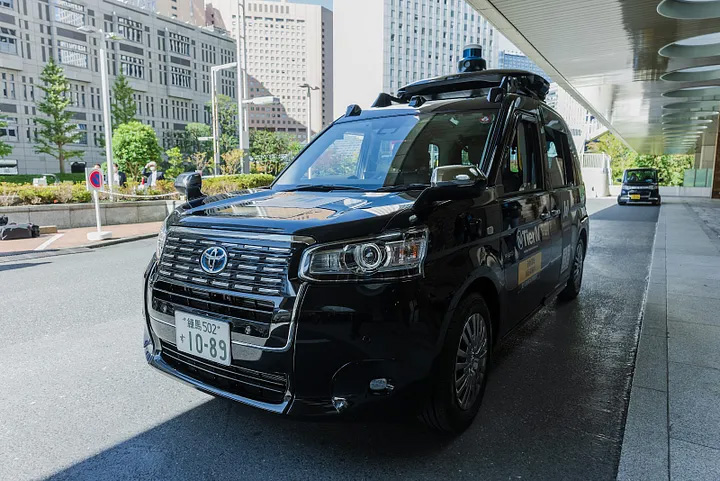
A JPN Taxi equipped for autonomous driving
Autoware provides not only modules for autonomous driving, but also calibration tools. The charts below show the calibration of accelerator and brake pedal parameters based on past driving data using the accel_brake_map_calibration tool. The blue lines indicate the completed calibration points, progressing from yellow to green to blue.
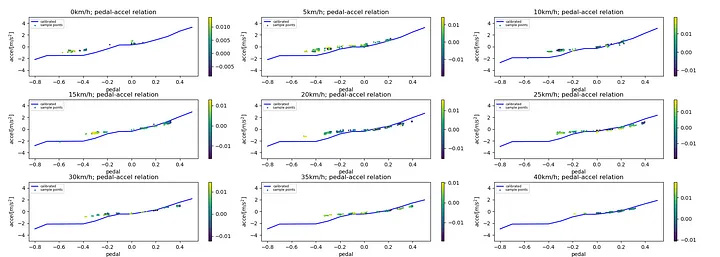
Calibration result (inadequate)
The chart above indicates discrepancies that were the result of a limited data set. When driving with these parameters, the vehicle experienced unnaturally strong deceleration when coming to a stop. We ultimately resolved the issue by applying the parameters shown in the chart below.
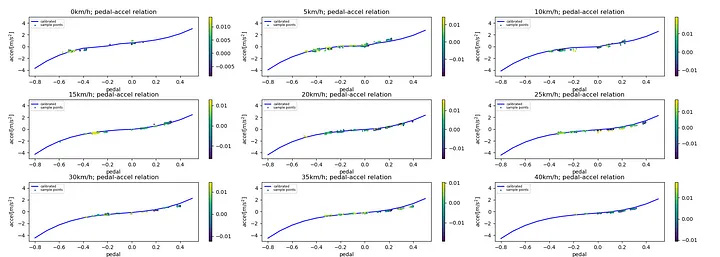
Calibration result (good)
Object detection using GPU
Because the robotaxi was equipped with a more powerful computer than the mobile robot, we were able to verify the GPU-accelerated LiDAR-based object detection algorithm. To test this, we manually drove the vehicle around our office and confirmed that surrounding vehicles and pedestrians were detected in real time, and that the predicted trajectories were valid.
Demonstration
Most of the testing up to this point had taken place at our office, but we also conducted autonomous driving trials outdoors, where several issues emerged. For example, the vehicle’s stopping behavior was inconsistent: it either braked too abruptly or came to a stop beyond the stop line. We traced the cause to insufficient calibration of the accelerator and brake systems.
In the final demonstration, the vehicle successfully drove through an intersection and avoided an obstacle—a mannequin simulating a pedestrian—confirming that Autoware’s functionality was fully operational.
Find the code for this section here: autoware.robotaxi
Reflections and improvements
After completing the demonstrations, we reflected on ways to improve access to the Autoware community. We identified three main areas of focus:
- Improving documentation to lower the hurdles for newcomers
- Fixing problems discovered in the vehicle integration process
- Sharing internally the obstacles we experienced
Among these, documentation stood out as the greatest challenge. From an external perspective, we felt that several aspects could be improved:
- Installation guidance and tutorials could be clearer
- Solutions to specific problems (for example, sudden stops or lane displacement) are difficult to find
- Connections between modules are not easy to understand
To address some of these points, we did the following:
- Organized the headings and contents of the installation and tutorial pages, with attention to overall structure and ease of maintenance rather than simply adding more detail
- Summarized the knowledge gained from this training in the documentation, providing concrete procedures for integrating Autoware into real vehicles
- Added specific user questions directly to the documentation, or posted the questions and answers on the Discussions page
- Expanded the Autoware Universe Documentation to include detailed explanations of each module
Wrap-up
This article set out to view Autoware from an “outsider’s” perspective, with the help of a team of recent graduates who managed to get two vehicles running autonomously in about a month. Along the way, they encountered challenges but were able to draw on feedback from the Autoware community through the Issues and Discussions pages – demonstrating the strength of open-source collaboration. At the same time, they identified gaps in the documentation and worked to address them. Through projects like this, we aim to keep lowering the barriers to entry and bring Autoware closer to widespread adoption worldwide. Every improvement, no matter how small, brings us closer to realizing safe, accessible autonomous driving for all.
TIER IV is always on the lookout for passionate individuals to join our journey. If you share our vision of making autonomous driving accessible to all, get in touch.
Visit our careers page to view all job openings.
If you’re uncertain about which roles align best with your experience, or if the current job openings don’t quite match your preferences, register your interest here. We’ll get in touch if a role that matches your experience becomes available, and schedule an informal interview.
Media contact
pr@tier4.jp
Business inquiries
sales@tier4.jp
Social Media
X (Japan/Global) | LinkedIn | Facebook | Instagram | YouTube
More